1. Menyiapkan Dokumen Cetak Plate
Tujuan:
Mempersiapkan dokumen panduan untuk mencetak plate sebuah proyek print
Trigger:
Plate komponen sudah tersedia di dalam folder penyimpanan proyek print terkait
Input:
- File dokumen Checklist Komponen Print
- Akses Google Drive Proyek 3D printing
- File Plate proyek print (ekstensi .gcode.3mf) di dalam folder Google Drive
Proyek 3D Print ->nama proyek print->proyek-print - plate- Contoh: Plate Mind in Motion bisa ditemukan di Google Drive
Proyek 3D Print-> folderMind in Motion->Mind in Motion - Plate
- Contoh: Plate Mind in Motion bisa ditemukan di Google Drive
- Akses tracking 3D printing di bagian
sheet 3D Printing
Langkah:
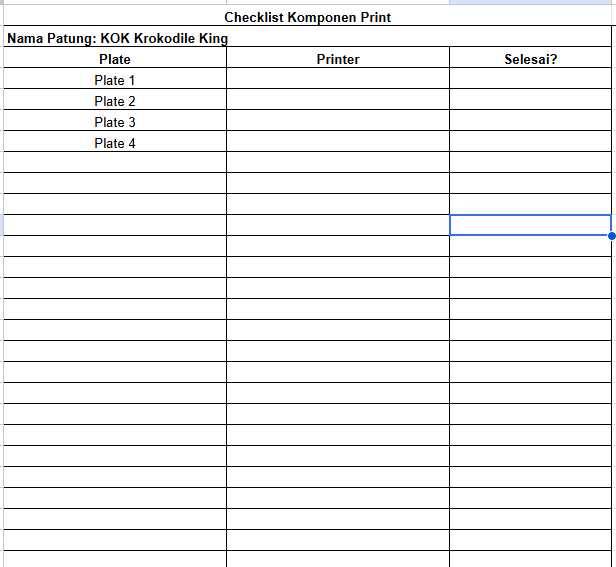
- Cetak file dokumen checklist komponen print sebanyak yang dibutuhkan
- Cari nama proyek yang perlu dikerjakan di tracking 3D printing di bagian
sheet 3d printing(bagian bawah layar) dengan label kolomplateberisicompleteddan kolomprintberisimenunggu - Buka file plate menggunakan aplikasi Bambu Studio
- Isi data nama proyek dan kode komponen (singkatan nama proyek atau nama file plate) pada dokumen checklist komponen print
- Tulis semua nomor plate di dalam file plate pada dokumen checklist komponen print
Output:
Dokumen checklist komponen print berisi data proyek dan daftar plate yang akan dicetak. Contoh: